Momentum Dashboard
A few weeks back we published, Internet Trading Indicator, you can get the trading view code here , using this logic I wanted to track best 100-150 internet companies in less than 15-30 mins over weekend.
I know have a solution that works for me, this post explains the solution and open sources it so that if you want you can leverage it,
every weekend my now rudimentary dashboard in google sheet looks like below
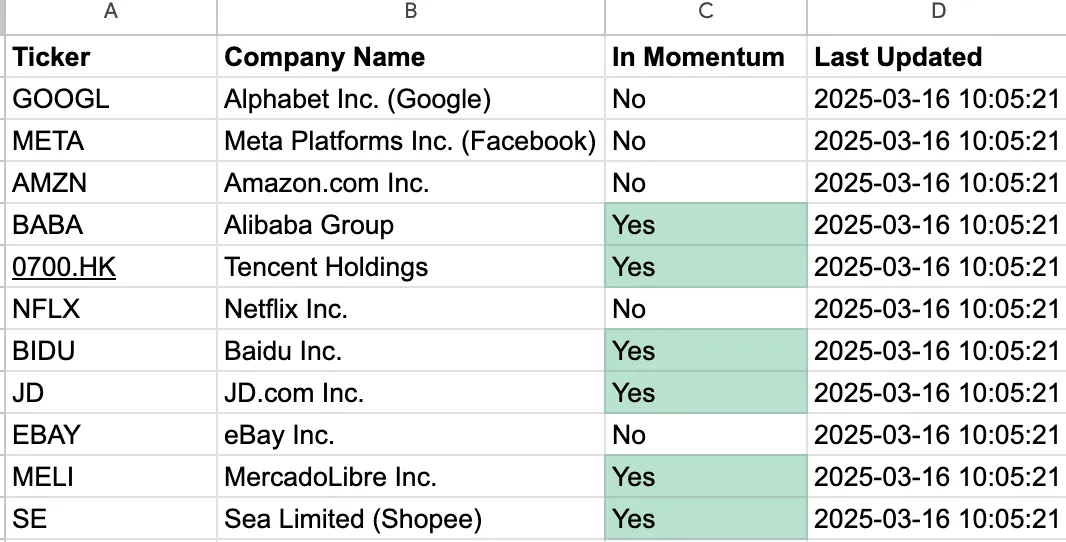
I can filter on “Yes” do few other checks manually and then can create or unwind positions if needed
The Solution
Tech Stack
-
Python + yfinance: Fetches 2 years of historical stock data and calculates Weekly MACD.
-
Google Sheets API: Stores raw data and hosts a dashboard.
-
GitHub Actions: Runs the script every Saturday at midnight UTC.
How It Works
-
Data Fetching: A Python script retrieves weekly closing prices for 100 tickers from Yahoo Finance, calculates MACD (EMA12, EMA26, Signal, Hist), and handles errors gracefully.
-
Data Storage: The script pushes results to “Sheet1” in a Google Sheet with columns: Ticker, Weekly Close, EMA12, EMA26, MACD, Signal, Hist.
-
Dashboard: A “Dashboard” sheet pulls data from “Sheet1,” adds company names from a “Stocks” sheet, calculates momentum status, and timestamps updates.
-
Automation: GitHub Actions runs the script weekly, ensuring fresh data without lifting a finger.
Step-by-Step Setup
Here’s how I built it—and how you can too!
1 Clone the Repository
-
Repo: github.com/vivek-bothra/StockMomentumTracker.
The repo includes:
-
fetch_stock_data.py: The Python script.
-
.github/workflows/weekly_stock_update.yml: GitHub Actions workflow
2. Set Up Google Sheets
Use Sample dashboard, I had , Also ensure to
-
Go to Google Cloud Console.
-
Create a project, enable the Sheets API, and create a Service Account.
-
Download the JSON key file (e.g., credentials.json).
-
Share your Sheet with the Service Account email (e.g., your-service-account@your-project.iam.gserviceaccount.com) as an Editor.
3. Configure the Python Script
- Open fetch_stock_data.py in the cloned repo.
Replace SHEET_ID with your Sheet ID:
SHEET_ID = 'YOUR_SHEET_ID_HERE'
- (Optional) Customize the tickers list to your stocks (mine tracks 100 for now, like GOOGL, 0700.HK, etc.).
4. Automate with GitHub Actions
-
Add GOOGLE_CREDENTIALS secret:
-
Go to Settings > Secrets and variables > Actions > New repository secret.
-
Name: GOOGLE_CREDENTIALS.
-
Value: Paste the full credentials.json content.
-
-
The workflow runs every Saturday at midnight UTC. Test it manually:
- Actions > “Weekly Stock Data Update” > Run workflow.
If you are stuck leave a comment here, I will try to answer as much as possible